- Published on
- 10 min read
Personal Zalo account full of friends? Why it needs cleaning up — and how to automate it in Pancake
- Published on

- Name
- Định Phan - netFull
This is a personal blog, not an official Pancake channel. Menu names and features may change between versions.
On this page
TL;DR: A personal Zalo contact list is capped: 1,000 contacts on a regular account and 2,000–10,000 on zBusiness plans. A sales account adds new customers every day, so it will hit that cap sooner or later. When it does, new customers can't add you anymore. Pancake just added Personal Zalo management and auto clean-up: it automatically removes friends who haven't messaged you in a while, withdraws stale friend requests, and deletes old messages, based on a 15/30/60/90-day threshold. This post helps you pick the right threshold so you don't remove loyal customers by mistake.
In Vietnam, many shops run their sales on a single personal Zalo account for years. Every customer who asks about a product gets added as a friend, so it's easy to send photos, bank details and delivery updates. Over time the list grows to thousands of people, and most of them bought once and never came back.
Nobody notices until a new customer tries to add you and can't, or Zalo shows this message:
"Your contact list has exceeded the supported limit. Please clean up your contact list or contact the zBusiness Official Account for support."
This message really exists in Zalo's zBusiness interface. Zalo's own suggested fix is to clean up your contacts.
Personal Zalo account limits
1. Number of friends
This is the limit that hurts most, and the only one Zalo publishes clearly.
| Account type | Max contacts | Price (12 months) |
|---|---|---|
| Regular account (free) | 1,000 | Free |
| zBusiness Basic | 2,000 | Free |
| zBusiness Lite | 2,500 | 990,000 VND |
| zBusiness Pro | 5,000 | 1,990,000 VND (or 199,000 VND/month) |
| zBusiness Max | 10,000 | 3,990,000 VND |
Sources: Zalo's zBusiness page (checked 11/2026) and the free-account limit effective 1 Aug 2022 (VnExpress, Vietnamese).
Two things shops often overlook:
- Upgrading only delays the problem. A shop adding 20 customers a day fills even the 5,000 contacts of the Pro plan in about 8 months.
- When a zBusiness plan expires or is cancelled, you go back to a regular account. Zalo states: "You have returned to your normal account and can no longer use the Basic package privileges". Those privileges include the larger contact list.
2. Messages and calls from strangers
On a regular account, Zalo lets you reply to only 40 strangers per month and your account shows up only 40 times a month when strangers search for your phone number (policy from 1 Aug 2022). Every zBusiness plan, including Basic, can receive messages and calls from strangers.
So on a regular account, it's hard to keep serving customers who aren't on your friend list. That makes every contact slot valuable. It should go to someone who is buying now, not someone who has been silent for two years.
3. Friend requests
Zalo doesn't publish official numbers here. What users have reported:
- Sending many requests in a short time can temporarily lock the friend-request feature. Roundup articles put it at roughly 30–50 requests a day, with lockouts of 24–48 hours (Thế Giới Di Động, FPT Shop, ZaChat, all in Vietnamese).
- Requests that are never accepted stay in your sent list. Many users report that once that list gets long, they have to withdraw some before they can send new ones.
These figures come from user experience, not official policy, and Zalo can change them at any time. The safe approach is don't let pending requests pile up.
4. Messages
Zalo doesn't publish a limit on how many messages an account can store. Old messages cause two practical problems:
- Storage. Photos, videos and files from customers take up phone storage. Backing them up requires the paid zCloud service (the Max plan includes 100GB zCloud Standard).
- Clutter. Thousands of old conversations make it slower to find the customers who need attention now.
Zalo also doesn't publish a daily sending limit. Vendors of messaging tools recommend not sending the same message to many people in a short time to avoid being flagged as spam. Again, this is practical advice, not an official number.
In short: why a sales Zalo account needs regular clean-up
| Problem | Consequence | What to clean up |
|---|---|---|
| Contact list hits the cap (1,000–10,000) | New customers can't add you, you lose orders | Friends who haven't messaged in a while |
| Sent friend requests pile up | You may be unable to send new requests | Sent requests that were never accepted |
| Old conversations build up | Wasted storage, harder to find active customers | Old messages |
Doing this by hand on your phone is painful. Zalo has no bulk option for removing friends or withdrawing requests, so you have to tap through people one by one.
What Pancake offers
Since 9 Nov 2026, Pancake has a Personal Zalo management section (see the changelog) for connected personal Zalo accounts. Go to Settings → Tools → Personal Zalo management. Only Administrators can use it.
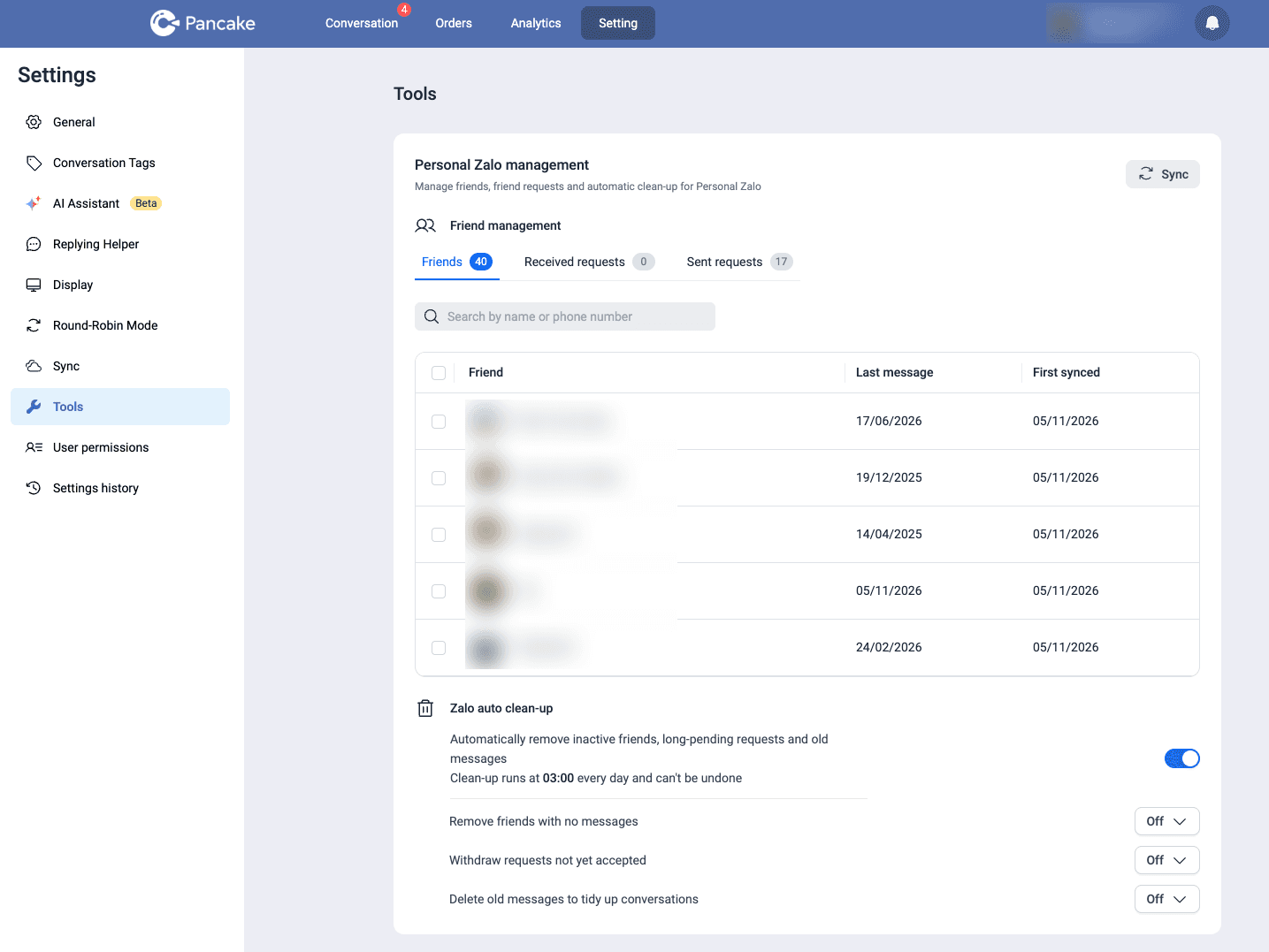
Friend management
- Click Sync to pull the latest lists from Zalo.
- There are 3 tabs: Friends, Received requests, Sent requests. Each tab shows a count next to its name, so you can see how close you are to the cap.
- Search by name or phone number.
- The friend table has a Last message column, showing the last time the customer messaged you. This is the same date the auto clean-up uses.
- You can select multiple people to remove friends, withdraw sent requests, or accept/decline received requests in bulk.
Zalo auto clean-up
Turn on the Zalo auto clean-up switch, then pick a threshold for each type. All 3 types are Off by default, and the thresholds are 15 / 30 / 60 / 90 days.
| Option in Pancake | What it does |
|---|---|
| Remove friends with no messages | Removes friends whose last message from the customer is older than the threshold |
| Withdraw requests not yet accepted | Withdraws sent requests still not accepted after the threshold |
| Delete old messages to tidy up conversations | Deletes messages older than the threshold |
How it runs:
- Every day at 03:00. If you turn it on now, the first clean-up happens at 3 a.m. the next morning.
- No cap on volume. Everything past the threshold is processed in that run. If your list has 2,000 friends and 1,500 are past the threshold, you'll have about 500 left the next morning.
- No exclusion list. You can't mark VIP customers as "keep". Anyone past the threshold is removed.
- "No messages" counts the customer's messages only. Messaging customers yourself won't keep them on the list. The clock only resets when the customer messages you.
WARNING
Auto clean-up can't be undone.
Deleted messages are gone from Pancake too, not just from Zalo. If you rely on Pancake to keep order history, payment screenshots or warranty conversations, think carefully before turning this on.
Deletion only affects your side. It doesn't unsend anything, so the customer still sees the messages on their end.
How to choose the right thresholds
There's no single right threshold for every shop. It depends on how often your customers come back to buy and how full your contact list is.
Step 1: Check how full your list is
Click Sync, then compare the number on the Friends tab with the cap for your Zalo plan (table above).
| Contact list usage | Status |
|---|---|
| Under 60% | Plenty of room, light clean-up as a precaution |
| 60–85% | Clean up regularly |
| Over 85% | Urgent. New customers will soon be unable to add you |
Step 2: Pick a threshold for each type
Withdraw requests not yet accepted → 15 days (recommended for most shops)
If a customer hasn't accepted after two weeks, they almost certainly won't. Withdrawing early keeps the list short and lowers the risk of being blocked from sending new requests. This option carries the least risk, so turn it on first.
Remove friends with no messages → match your repeat-purchase cycle
| Shop type | Examples | Suggested threshold |
|---|---|---|
| Frequent repeat buyers | Food, snacks, everyday cosmetics | 60–90 days |
| Seasonal or infrequent buyers | Seasonal fashion, homeware, gifts | 90 days |
| One-off, fast purchases | Electronics, furniture, high-value items | 30–60 days |
| Contact list already over 85% | Any | 30 days for now, then relax it once below 60% |
Rule of thumb: the threshold should be longer than your customers' usual repeat-purchase cycle. If cosmetics customers come back about every 45 days and you pick 30, you'll remove exactly the people who are about to reorder.
Since there's no exclusion list, wholesale buyers, partners or VIP customers who've been quiet will also be removed. If you have a lot of these relationships, choose 90 days and review the list first (see Step 3).
Delete old messages to tidy up conversations → leave it Off unless you're sure
Deleted messages are gone from Pancake as well. Only turn this on if your order history and payment records are stored elsewhere (for example, orders already in Pancake POS or CRM), and preferably at 90 days.
Step 3: Turn things on in a safe order
The first 03:00 run removes everything past the threshold at once, so go step by step:
- Before turning anything on: Click Sync, open the Friends tab and search for your VIP customers, wholesale buyers and partners. Check the Last message column: anyone older than the threshold you plan to use will be removed that night. If you want to keep them, pick a longer threshold.
- Day 1: Turn on Withdraw requests not yet accepted → 15 days. Check the Sent requests count the next morning.
- Days 2–3: Turn on Remove friends with no messages with the longest threshold that fits (usually 90 days). Check the Friends count the next morning.
- After 2–4 weeks: If the list is still growing fast and nearing the cap, lower the threshold to 60, then 30 days.
- Delete old messages: Only turn this on once you're sure order history is stored elsewhere.
Checklist before you turn it on
- You know your Zalo plan and its contact cap
- You've clicked Sync and checked the friend, received-request and sent-request counts
- You've reviewed the Last message column for VIPs, wholesale buyers and partners
- You know your customers' average repeat-purchase cycle
- You've decided whether to delete old messages, knowing they'll disappear from Pancake too
- You understand that every clean-up action can't be undone
FAQ
If I upgrade to zBusiness Pro or Max, do I still need to clean up? Yes, just less often. Upgrading raises the cap, but your list keeps growing every day. Auto clean-up keeps it stable without endless upgrades.
Can I keep certain VIP customers? There's no exclusion list yet. The only way is to choose a threshold longer than the time your VIPs usually go quiet. When a VIP messages you, their clock resets.
If my shop messages a customer, does that keep them on the list? No. The "no messages" threshold is based on the customer's last message, not messages your shop sends.
What happens when a removed customer messages me again? They'll appear as a stranger. On a regular account you can only reply to 40 strangers a month (zBusiness plans handle stranger messages more freely), so don't set the threshold too short for customers who might come back.
After deleting old messages, does Pancake keep the history? No. Deleted messages no longer appear in Pancake. The customer still has them on their side.
If I turn it on at 10 a.m., when does clean-up start? At 03:00 the next morning. That run processes everything already past the threshold.
Related docs
- Connect personal Zalo to Pancake (Vietnamese)
- Pancake changelog (Vietnamese)
- Compare zBusiness plans (Vietnamese)
More in No-code & AI
- Pancake now has an Email channel — connect via SMTP/IMAP and stop switching to Outlook
- After-hours auto-reply with Botcake AI — set it up so the AI doesn't trample your team
- An AI assistant for Pancake: 10 ready-made prompts, plus how to write your own
- Pancake API MCP — Ship Pancake API docs + live calls into Claude Desktop / Cursor in 5 minutes
- The Pancake Ecosystem — Overview + Deep Dive into Pancake Multi-Channel Chat